01A · BRANDINGClient portal
A familiar experience for clients
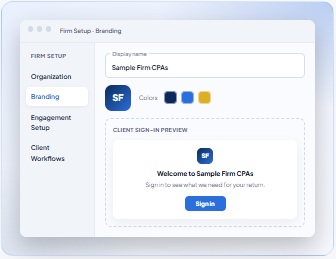
Configure your firm's name, logo, colors, welcome message and client-facing information. Invitations and the branded portal present your firm rather than a generic upload screen.
THEMIS · PRODUCT TOUR
Themis connects the work that happens before a tax return is filed—client onboarding, secure document collection, AI-assisted reading, tax workpapers, professional review, and transfer to supported tax software with Themis Relay. Follow a Form 1040 engagement from setup through transfer.
Brand your portal, invite your team, and create the engagement.
Request documents, read prior and current-year records, and resolve uncertain facts.
Build workpapers, review the Form 1040 draft, and transfer approved inputs with Themis Relay.
Start with your firm's identity, roles, and preferred workflow. You can use starter configurations, then customize the details that fit your practice.
Configure your firm's name, logo, colors, welcome message and client-facing information. Invitations and the branded portal present your firm rather than a generic upload screen.
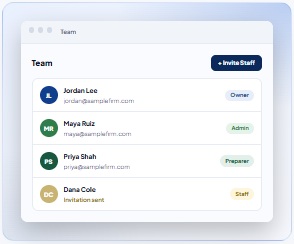
Set up owners, administrators, preparers and staff. Roles help determine who can manage settings and who handles client requests, documents and preparation.
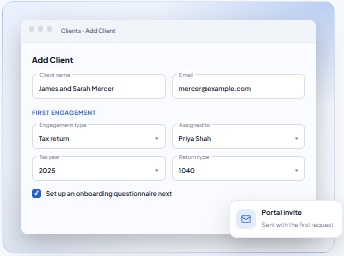
Add the client, choose the engagement and tax year, assign a preparer, and decide whether to send an onboarding questionnaire. Clients receive their secure invitation when you send the first request.
Start from prior-year information when available, tailor requests for this year's circumstances, and give clients one branded place to respond. Staff can also upload files directly.
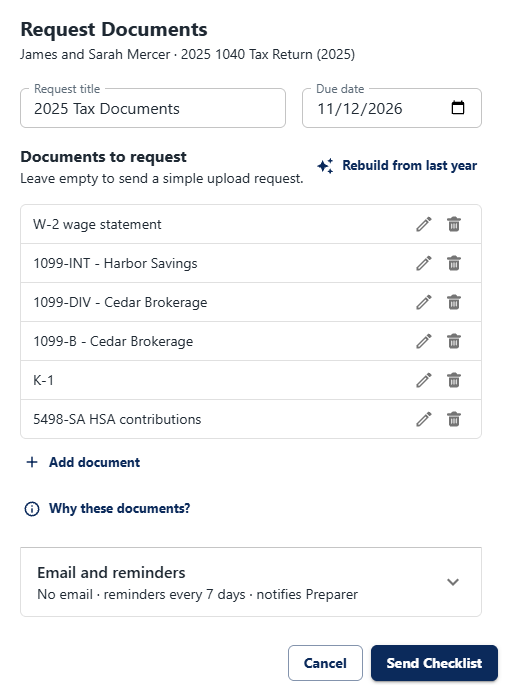
DOCUMENT REQUESTS & REMINDERS
Create a request from what the client filed last year, refine it with current-year questions, add or remove items, and approve the list before sending it. New clients can start with your firm's standard document list or a questionnaire.
Portal replies, messages and request updates belong in a shared client history, rather than a preparer's private inbox. Outlook messages can be saved to the client's record.
Explore client communications →Clients can upload files, answer questionnaires, report that a document isn't available, and access files your firm chooses to share—all within their client-specific portal.
Explore the branded portal →A client may email a file, bring it to your office, or upload it directly. Your staff can add documents to the engagement without forcing every client through the portal.
Explore document extraction →Review prior-year information alongside current-year documents in the same engagement.
PRIOR-YEAR RETURN READING
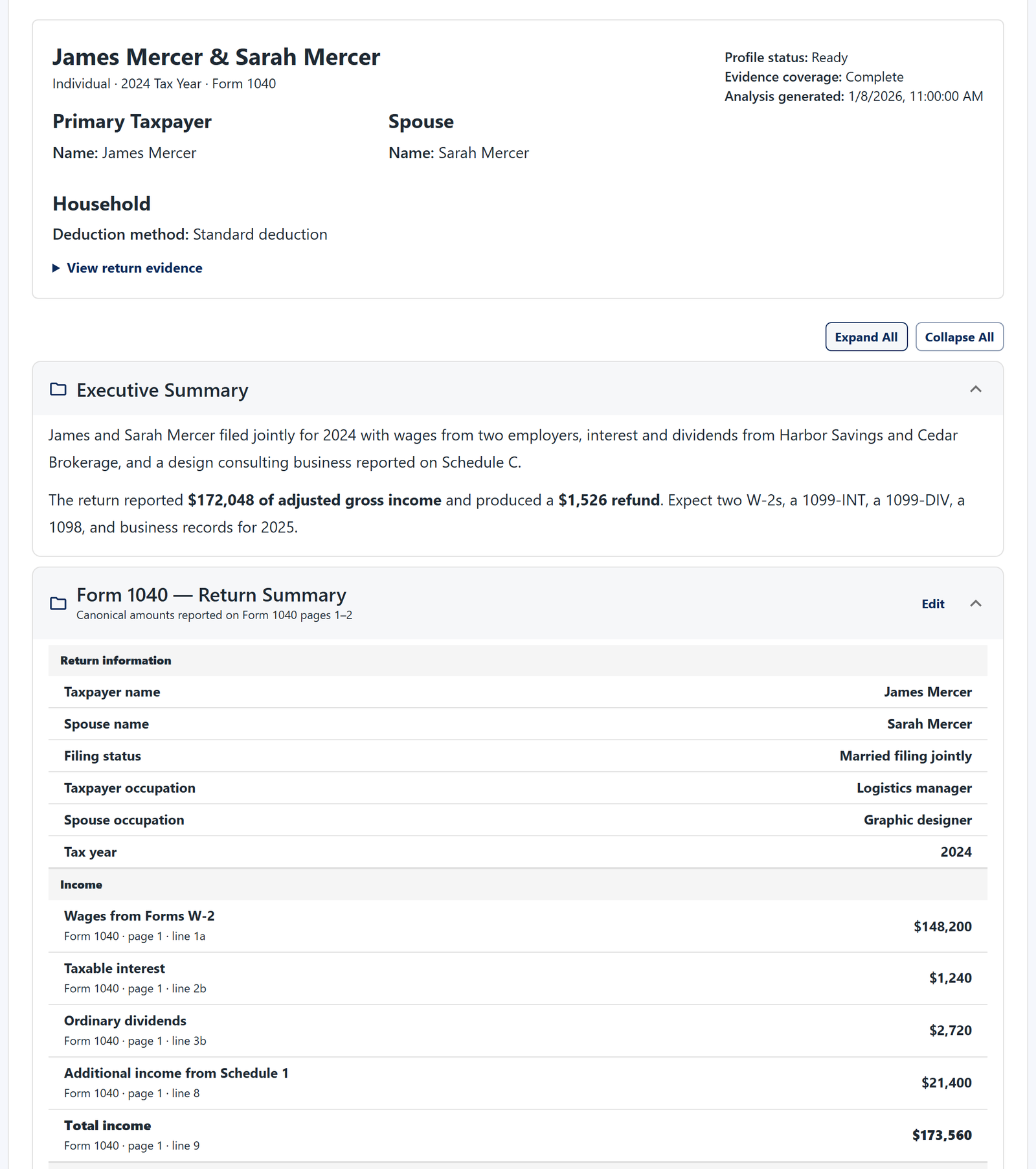
Upload a previously filed Form 1040, even if another firm prepared it. Themis reads the return and builds a prior-year profile with information your team can review.
SOURCE DOCUMENT EXTRACTION
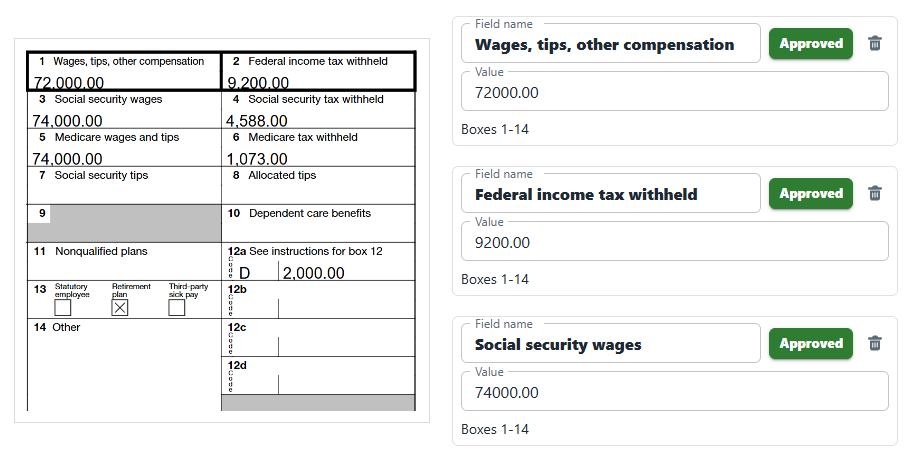
Themis extracts tax data from supported forms and records, including W-2, W-2G, SSA-1099, 1095-A, 1098, 1098-E, 1098-T, 1099-B, 1099-DIV, 1099-INT, 1099-K, 1099-NEC, 1099-R, and Schedule K-1, plus brokerage statements. Your team can compare extracted figures with the source documents, correct them, and enter missing information before approval.
CURRENT-YEAR TAX PROFILE
Bring accepted current-year evidence into a coherent view of the client's tax year. Compare current activity with the prior-year baseline and review flagged items before preparing the return.
Confirm missing amounts and resolve discrepancies against the source records before using the figures.
Explore current-year tax profile ↗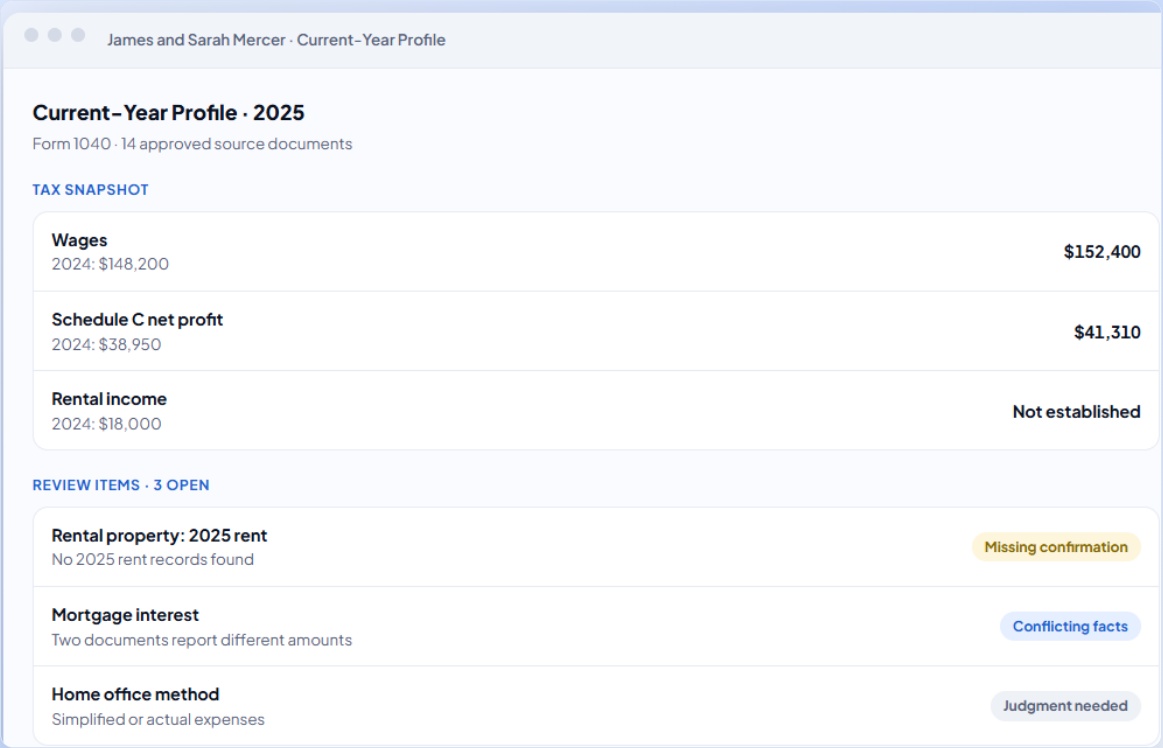
Prepare Form 1040 workpapers using approved source data, prior-year comparisons, and staff adjustments. Form 1040 preparation and integration are available now. Support for Forms 1041, 1065, 1120, and 1120-S is coming soon.
WORKSHEETS & CALCULATIONS
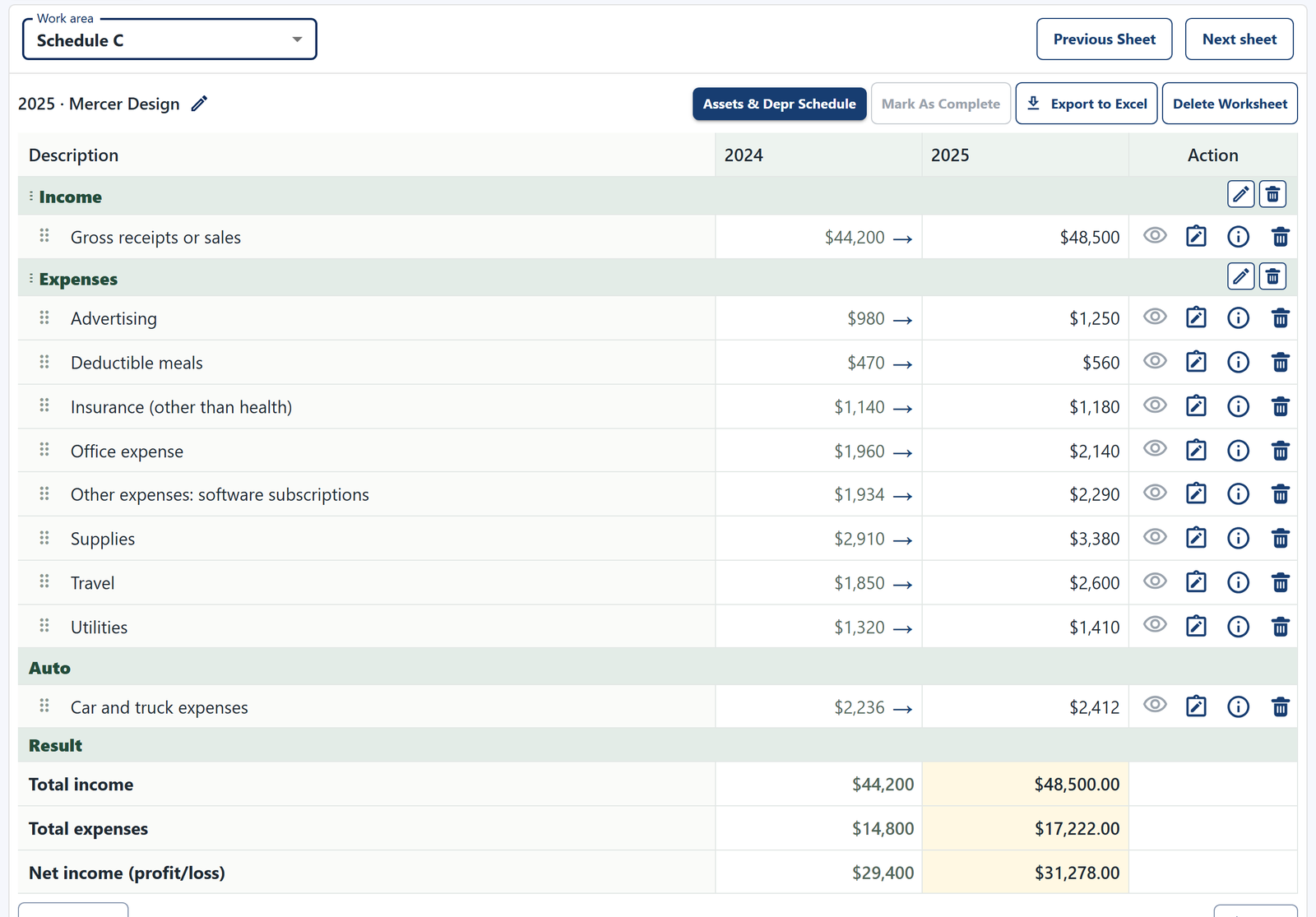
Open form- and activity-specific worksheets that bring forward prior-year comparison amounts and current-year approved source information. Staff can correct entries, allocate amounts, enter contributions or adjustments, and review the math.
THE DIFFERENCE A WORKPAPER MAKES
Use the side-by-side Schedule C figures to spot changes your team may need to investigate.
| Schedule C | 2024 | 2025 |
|---|---|---|
| Gross receipts | $44,200 | $48,500 |
| Expenses | $14,800 | $17,222 |
| Net profit | $29,400 | $31,278 |
Review means more than a green check. A reliable process separates calculation verification, outstanding questions, professional decisions, and the draft return produced from a specific set of inputs.
REVIEW & FINAL DRAFT
Examine supported calculation checks, review totals and year-over-year changes, and inspect the Form 1040 draft and included schedules. Your team remains responsible for deciding the appropriate treatment and whether a return is ready to go forward.
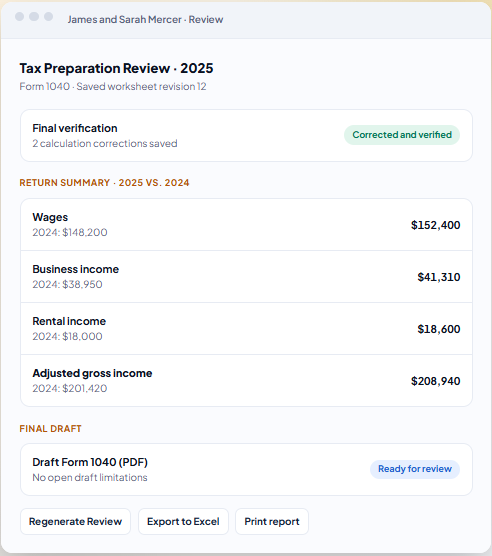
Passing an automated check means the supported test completed on the examined inputs. It does not prove that every source document is present, every tax position is correct, or the return is ready to file. If the underlying workpapers change, review the new revision rather than relying on an older report.
Themis supports the work leading up to filing. Your preparers make the final corrections and file through their tax preparation system.
Supported worksheet inputs
Supported source documents
Transfer results and exceptions
Your preparer checks destination values before filing.THEMIS RELAY & EXCEL
Use Themis Relay to transfer approved Form 1040 data to Drake, ProConnect, or ProSeries. Lacerte and CCH Axcess integrations are coming soon. This example shows how your team uses Relay to send approved inputs to ProConnect and review the results before filing.
Verify the transferred figures in your tax software before filing.
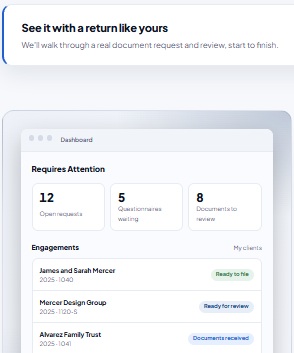
While one preparer is reviewing a return, firm leaders and client-facing staff still need to know who owns the next step, which documents are outstanding and where capacity is needed.
DASHBOARD & REPORTS
Use engagement views and reporting to understand progress through the workflow, identify requests waiting on clients, locate documents needing staff review, and coordinate responsibility across your team.
FREQUENTLY ASKED QUESTIONS
What firms usually want to understand before adopting a new preparation workflow.
No. Themis focuses on collecting, understanding, organizing and reviewing information before filing. Themis Relay supports Form 1040 transfers to Drake, ProConnect, and ProSeries. Lacerte and CCH Axcess integrations are coming soon. For other tax software, you can export workpapers to Excel. Your team reviews the Form 1040 draft in Themis, then completes and files the return in your tax software.
No. Clients can use your branded secure portal, and staff can upload files directly to a client engagement. Themis extracts tax data from supported uploads. Staff review the results and can correct or supplement the information.
The firm can begin with a standard document request or questionnaire, then collect current-year information. Prior-year comparisons are included only when a suitable prior-year return is available and has been read and reviewed.
No. Themis is designed to organize evidence, perform supported calculations and surface exceptions. Preparers and reviewers retain responsibility for tax treatment, return completeness, final review and filing.
New documents can change the workpapers or current-year analysis. Your team should review the updated inputs and regenerate or refresh dependent reviews and drafts rather than assume an earlier report still represents the current engagement.
Availability of in-app page tours depends on the deployed release. For an end-to-end demonstration of the current workflow, book a guided demo with the Themis team.
SEE THE COMPLETE WORKFLOW
See how Themis takes a real-world tax scenario from document request to reviewable workpapers and a controlled handoff—without taking the professional judgment away from your team.