Start with what you already know.
Prior-year forms and activities provide a starting structure. Approved current-year amounts go to the appropriate workpaper for staff review.
FEATURES · TAX WORKSHEETS
Themis brings together the prior-year return, approved current-year documents, and your team's adjustments to build organized tax worksheets. Review this year's figures beside last year's, trace amounts to their source, and resolve exceptions before the return moves forward.
Prior-year forms and activities provide a starting structure. Approved current-year amounts go to the appropriate workpaper for staff review.
See the underlying document, page, prior-year comparison, or staff-entered adjustment—not just a number with no explanation.
Missing facts, conflicting sources, and items needing judgment remain open for your team instead of being silently filled or guessed.
HOW IT WORKS
Documents and decisions flow into one place, while your preparers remain in control of every consequential amount.
The prior-year return helps identify forms, businesses, rental properties, and comparison lines. Staff can add or remove worksheets as needed.
Approved source data can populate supported worksheet lines. Staff review the worksheet, activity, and taxpayer before approval.
Review prior-year differences, attach sources, allocate amounts, make documented edits, and verify supported calculated totals.
Resolve open items, check supporting evidence, mark completed workpapers, and export to Excel or continue into return preparation.
INSIDE THEMIS
A familiar workpaper view—with evidence and review controls built around it.
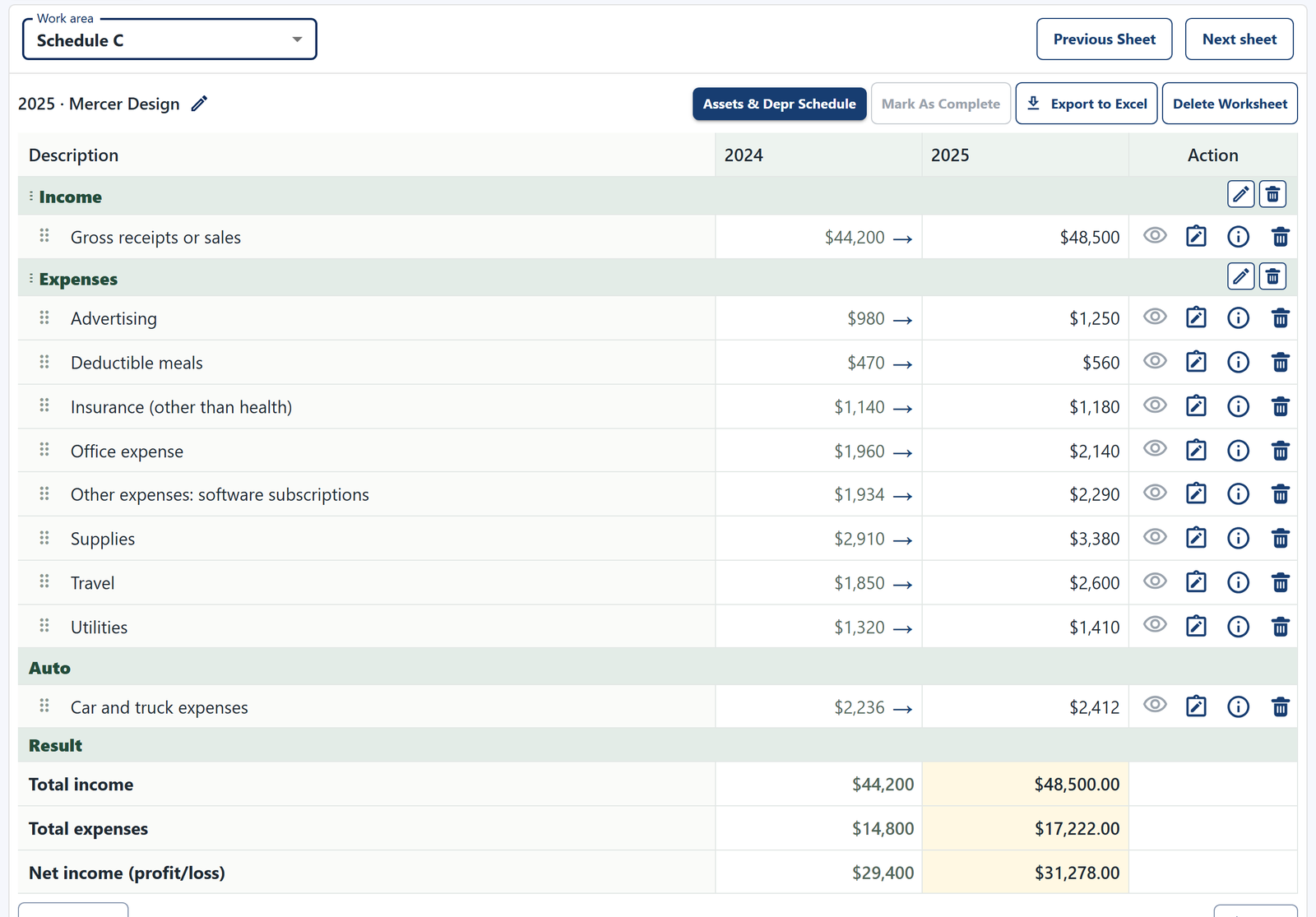
These are illustrative values from the sample screenshot, not actual taxpayer information.
BUILT FOR ACCURACY
Tax workpapers need more than extracted figures. Themis keeps source evidence, review decisions, and manual changes connected so staff can explain what was used—and why.
Explore source-document extractionInspect the document evidence behind an included value instead of searching through uploaded PDFs.
A second document may corroborate an amount rather than create a second entry. Review potential duplicates and overlapping facts before totals change.
Corrections, allocations, manual entries, and explanations are distinct from machine-read source values; they should not be silently overwritten by a later upload.
Check unresolved amounts against the supporting records before relying on calculated totals.
WHAT'S INCLUDED
Built around the real tasks preparers perform between document collection and filing—not just a spreadsheet with imported numbers.
See the previous year's reported amounts beside current-year figures. Carry forward a value only when it truly applies—not by assumption.
Keep evidence associated with the correct taxpayer, business, rental property, or pass-through activity—even when multiple activities share a form type.
Split an amount across relevant activities, make an adjustment, and keep its source and the staff's treatment visible for reconciliation.
Supported worksheet totals use deterministic calculations. Review missing inputs, inconsistent amounts, and reconciliation issues before approval.
Add supporting rows, revise a description, preserve notes, or archive details that do not belong in the current-year return.
Bring existing schedules into your workflow and export reviewable workpapers to Excel, while maintaining the organized Themis record.
REVIEW SOURCES AND ALLOCATIONS
A single source amount can relate to more than one activity. Themis's workpaper approach separates the original evidence from the allocations and worksheet entries built from it.
That distinction matters when a preparer reallocates an expense, corrects a classification, or receives another document supporting an existing amount.
ILLUSTRATIVE WORKPAPER EXAMPLE — NOT AN APP SCREENSHOT
MORE THAN A GENERIC TAX TABLE
Keep the activities, supporting schedules, and asset details behind the numbers organized as separate, reviewable workpapers.
Organize gross receipts, expense categories, vehicle costs, business identity, and net results for each distinct activity.
Keep each rental property and its supporting income, expense, and property information separate.
Connect business or rental activities with asset detail needed for a defensible depreciation review.
Worksheets organize the evidence and calculations available in the supported workflow; complex tax treatments and elections still require professional review.
FREQUENTLY ASKED QUESTIONS
No. Prior-year return details can establish the starting workpaper structure. Approved current-year evidence is then used for source-backed population; documents still in review remain unresolved rather than becoming authoritative numbers.
Not automatically. Matching or overlapping records may provide supporting evidence rather than two separate amounts. The team reviews whether documents corroborate an existing line, represent distinct transactions, or require reconciliation.
Prior-year figures are displayed as context. Where an amount genuinely carries forward, your team can review or copy it. A previous-year expense does not automatically become a current-year expense.
Staff can correct or allocate amounts in the workpaper while keeping the uploaded document unchanged. Review the current worksheet values after reprocessing a document.
Supported workpaper totals and dependent values use deterministic logic and validation. Missing inputs and unresolved tax judgments still require review. The worksheet layer does not claim to replace every tax rule, limitation, or final return calculation.
The worksheet workflow includes Excel import and export for supported schedules. Staff can continue to work with familiar tabular data while reviewing and organizing values in Themis.
No. Themis prepares organized, reviewable tax information and workpapers upstream of the return. After reviewing your workpapers, use Themis Relay to transfer approved Form 1040 inputs to supported tax software. Supported fields and documents vary by integration.
SEE THE WORKFLOW IN ACTION
Walk through a sample Schedule C workpaper using illustrative client data. See the source evidence, prior-year comparisons, staff edits, and calculated results.