Less Data Entry. More Tax Work.
Themis extracts amounts and details from uploaded tax documents, giving preparers a head start without manually entering every line.
FEATURES SOURCE DOCUMENT EXTRACTION
Themis processes uploaded tax forms and supporting records for data extraction. Your team can compare extracted values with the original documents, make corrections, and fill in missing information before approval.
Book a DemoThemis extracts amounts and details from uploaded tax documents, giving preparers a head start without manually entering every line.
Combined uploads are separated into logical documents and identified by form, so the right information is easier to find.
See the original document beside the extracted values. Check anything uncertain, make corrections, and approve with confidence.
HOW IT WORKS
Send a document request or let your staff upload files directly. Themis handles the document reading and organization, while your team stays in control of review and approval.
Clients upload through your firm's branded, secure portal, or staff add files directly to the client's record.
With automatic processing enabled, forms are identified, combined files are separated, and information is extracted.
Compare extracted values with the original document and resolve flagged items.
Your team reviews and approves extracted values for use in supported Form 1040 worksheets.
INSIDE THEMIS
On the client's Source Docs page, your team can see identified forms, source files, processing dates, AI confidence, and which documents are approved or need attention.
IN THEMIS Client record Source Docs
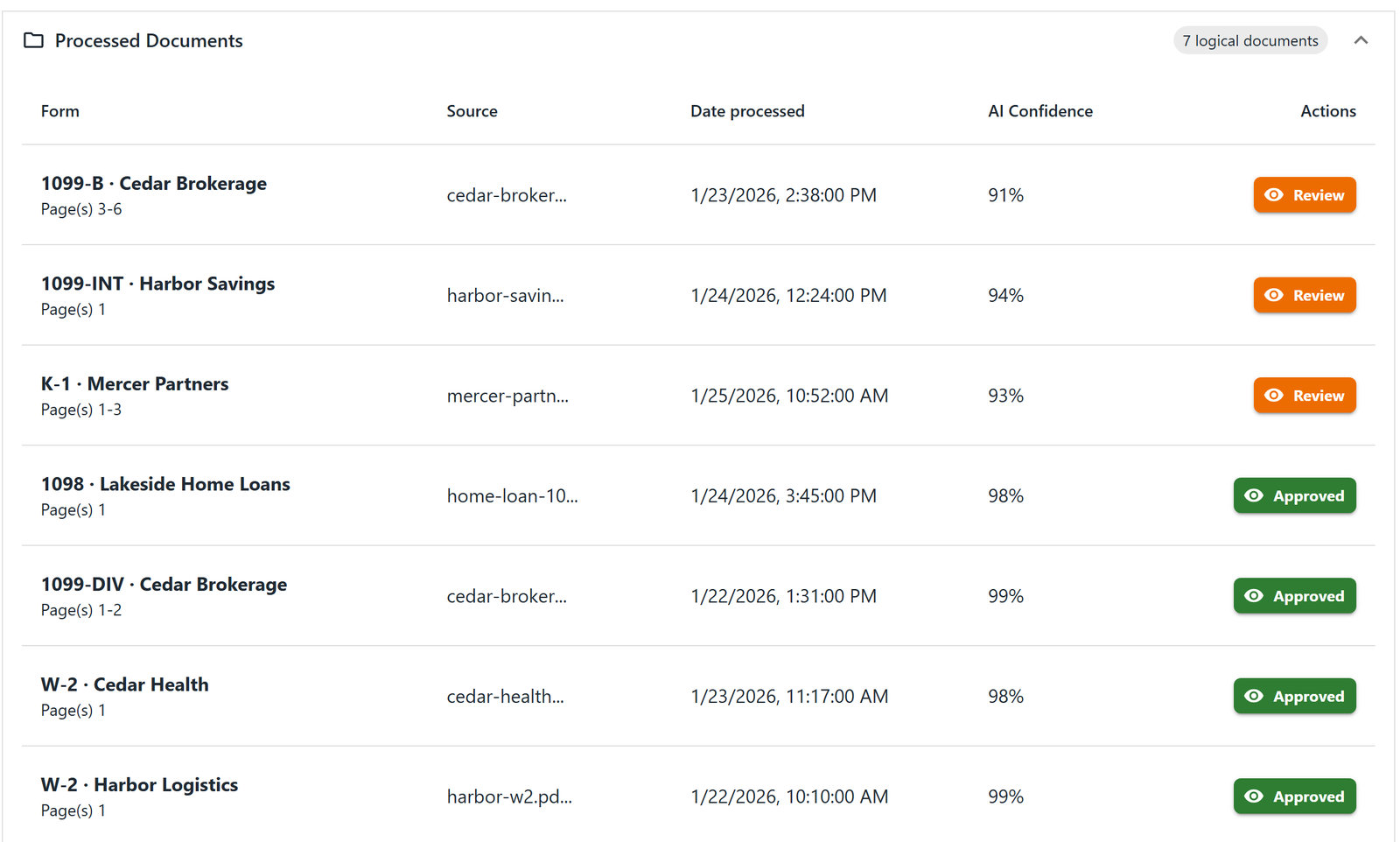
Your team can open a document to inspect its extracted information and the original pages before approval.
WHAT'S INCLUDED
Real tax documents aren't always clean, complete, or perfectly organized. Themis provides the tools to get them ready without losing track of their original source.
Themis can separate and label supported tax forms within a combined PDF, including individual forms in a brokerage statement.
Review documents identified as possible duplicates and decide which one should remain in the client's file.
Rotate sideways pages, split or merge documents, and run a new reading when a file needs a second pass.
Edit a reading or add a value that was missed while keeping the original uploaded document intact.
Compare extracted values with the original documents and correct them before approval.
Approved values can populate supported Form 1040 worksheets and schedules.
FREQUENTLY ASKED QUESTIONS
Clients and staff can upload tax forms and supporting records as PDF, JPG, PNG, or TIFF. See the full list of examples from the homepage. Themis also reads prior-year Form 1040 returns. Return preparation and tax software integration currently support Form 1040.
Themis can flag potential issues for review. Staff can compare the value with its source document, correct it if necessary, and approve it.
Yes. Staff can correct or add extracted values during review. The original uploaded file remains preserved as the source of record.
Themis keeps each firm’s data separate. Clients can access the documents your firm shares with them. See the Privacy Policy for details on how Themis handles information.
SEE IT IN ACTION
We'll show you how a client upload becomes organized source documents, extracted values, review flags, and approved worksheet information.