Send the Request. Let Themis Handle the Follow-Ups.
Stop building document checklists from scratch and chasing clients for missing paperwork. Themis can suggest a document checklist using a prior-year Form 1040. Your team can add or remove items and approve the request before sending it through your firm's branded client portal. Schedule reminders for outstanding items. Clients can upload documents or let your firm know when an item is unavailable or was already provided.
- Checklist suggestions based on prior-year Form 1040 information
- Staff review and approval before sending
- Automatic reminders that stop when requests are complete
Start With a Suggested Checklist
Themis can suggest a checklist based on the client's prior-year Form 1040. Review, customize, and send without manually creating every request.
Schedule Reminders for Outstanding Documents
Set your reminder schedule once and let Themis handle the follow-ups. Reminders automatically stop when the request is complete.
See Which Items Are Outstanding
Your team and your clients can see which documents have arrived and which are still outstanding—all in one secure, organized workflow.
Build, Send, and Track Document Requests
Themis simplifies document collection from start to finish, helping your team spend less time managing requests and more time preparing returns.
-
Build from Last Year
Themis can suggest documents based on the client's prior-year Form 1040. Add, edit, or remove items and see why each document was requested.
-
Ask What Changed
Include questions about the client's current tax situation. Their answers help identify additional documents that may be needed for this year's return.
-
Review, Schedule, and Send
Review the request, establish a due date, and choose your reminder schedule. Nothing is sent until your team approves and sends the request.
-
Track Documents as They Arrive
Themis updates the checklist as clients upload documents. Clients can also indicate when a document is unavailable or has already been provided, keeping everyone informed about what's outstanding.
Less paperwork. Fewer follow-ups. More time preparing returns.
Manage Requests for One Client or a Group.
Review checklists, set reminders, and track outstanding items.
Generate personalized checklists, review requested documents, configure reminders, and send multiple requests without repeating the process for every client.
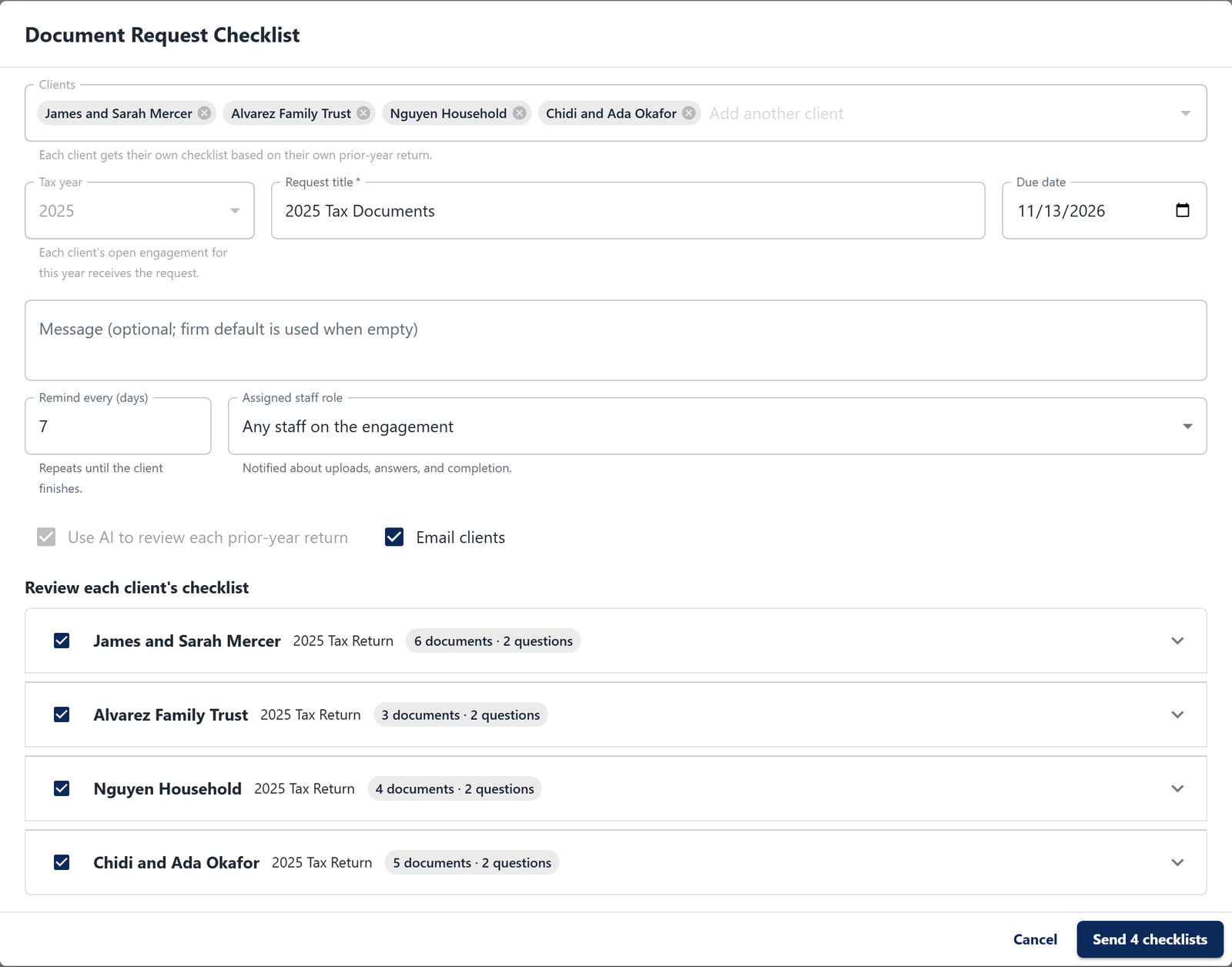
- Individual requests
- Client Record → Request Documents
- Multiple requests
- Clients → Actions → Document Request Checklist
Built for Busy Season. Designed Around Your Workflow.
Organize document collection, manage client communications, and track requests.
Send Requests to Multiple Clients
Select a group of clients, review their personalized checklists, and send document requests in a single workflow. No need to repeat the same process for every return.
Set Due Dates and Reminder Schedules
Set a due date and choose from the available reminder settings for each request.
Automatic Reminders on Your Schedule
Choose from the available reminder settings. Choose your schedule, disable reminders when unnecessary, and let Themis stop following up when requests are complete.
Professional, Customizable Emails
Use ready-made email templates or customize the language to reflect your firm's communication style. Deliver a consistent, professional experience without writing every message from scratch.
Your Firm's Document Templates
Configure the types of documents your firm requests and the terminology used in your checklists. Standardize document collection while preserving flexibility for individual clients.
Request Additional Documents Anytime
Need something else? Add items to an existing request or create a separate request. Keep document collection moving as new information becomes available.
Common Questions
What if a client is new and has no prior-year documents?
No problem. Send a general document-upload request, select items from your firm's document templates, or begin with an onboarding questionnaire to identify the information needed for their return.
Can I modify a document request before sending it?
Absolutely. Add, edit, or remove requested items, adjust deadlines, and configure reminders. Your team retains control over what is sent and when.
How often can automatic reminders be sent?
Choose from the available reminder settings for each request. Reminders are optional and automatically stop once the request is complete.
What does the client see?
Clients access your firm's branded, secure portal, where they can review requested documents, upload files, and track which items have been received or are still outstanding. Explore the Client Portal.
See Your First Document Request Built in a Demo
Discover how Themis builds personalized document requests, automates client follow-ups, and keeps your team informed throughout document collection.
We'll demonstrate the complete process using the Sample Tax Return, from generating the checklist to showing what your client sees.