Don’t enter last year twice.
Turn the filed return into an organized starting point instead of entering information again by hand.
FEATURES PRIOR-YEAR RETURN READING
Upload a prior-year Form 1040. Themis extracts information from the return and supported schedules to build a profile your team can review and correct.
Turn the filed return into an organized starting point instead of entering information again by hand.
Use what appeared on last year’s return to help build this year’s document request.
Give preparers prior-year context so missing items and year-over-year differences are easier to identify.
From a return filed last year to a reviewable foundation for this year’s engagement.
Add the client’s prior-year tax return—even when your firm didn’t prepare it.
AI organizes filing details, income, deductions, credits, and schedules into a structured record.
Verify the information, look back at its source, and approve the baseline for current-year work.
Use the baseline to build document requests, populate prior-year worksheet columns, and flag differences.
See how Themis turns a prior-year return into a readable overview, with a summary, organized return sections, and values your team can check against the source.
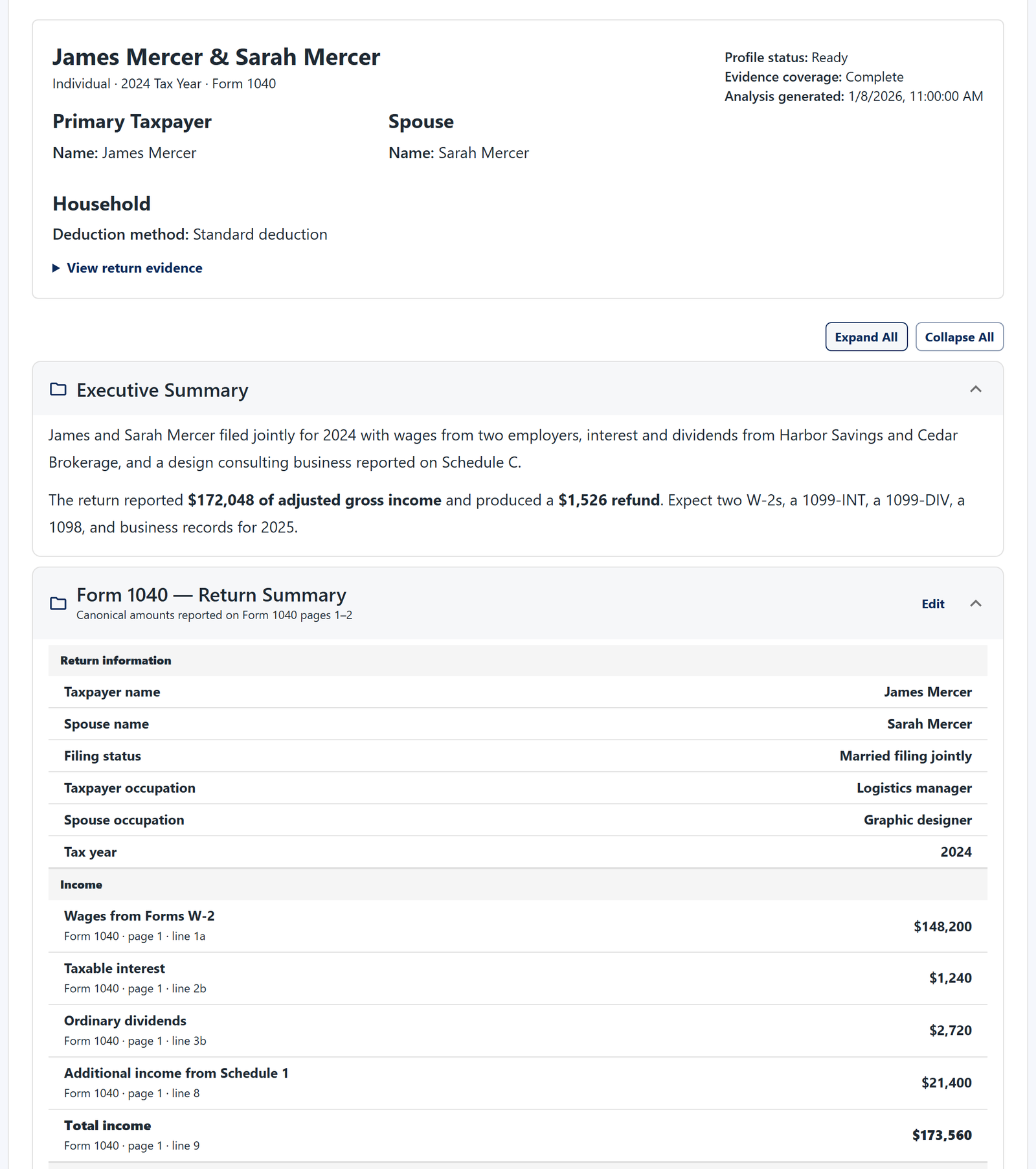
Actual Themis prior-year workspace. Staff can review the recorded details before using them for the current year.
Extracting last year’s values is only the beginning. Themis connects that information to the work your firm needs to do next.
Explore document requestsStart with evidence of what the client reported last year instead of an empty checklist.
See previous amounts alongside current-year entries when reviewing the return.
Make differences easier to notice as new source documents and current-year details arrive.
Less time reconstructing the past. More time evaluating the return in front of you.
Read prior-year Form 1040 and its supported schedules. Forms 1041, 1065, 1120, and 1120-S are coming soon.
Capture the filing profile and tax-related details that help inform the next engagement.
Organize reported financial amounts into a structured starting profile for review.
Give staff a familiar prior-year reference when assessing current-year activity.
Review the extracted information alongside evidence from the uploaded return.
Keep the reviewed prior-year information available to support the current-year workflow.
Themis supports prior-year Form 1040 returns. The information available for extraction depends on the schedules included with the return. Support for Forms 1041, 1065, 1120, and 1120-S is coming soon.
You can upload the return that the previous preparer filed. Themis uses the document itself to build the initial prior-year profile, so it is not limited to returns previously prepared in Themis.
No. Staff review and approve prior-year information before treating it as the current-year baseline. AI extraction supports your team’s review; it does not replace professional judgment.
The prior-year profile helps build this year’s document request and provides comparative amounts in worksheets. Incoming documents can then be reviewed in the context of what the client reported previously.
Prior-Year Return Reading builds a profile from a filed Form 1040. Source Document Extraction reads this year’s W-2s, 1099s, K-1s, and other supporting documents. The two workflows complement one another.
See a real prior-year return go from upload to a reviewable profile, connected document requests, and ready-to-use worksheets.