
Automated tax preparation for tax firms and CPAs

Your Clients Upload.
Themis Does the Rest.

Themis sends document requests to clients, extracts the data, follows up on missing items, populates worksheets with the data you approve, and then transfers data to supported tax software.
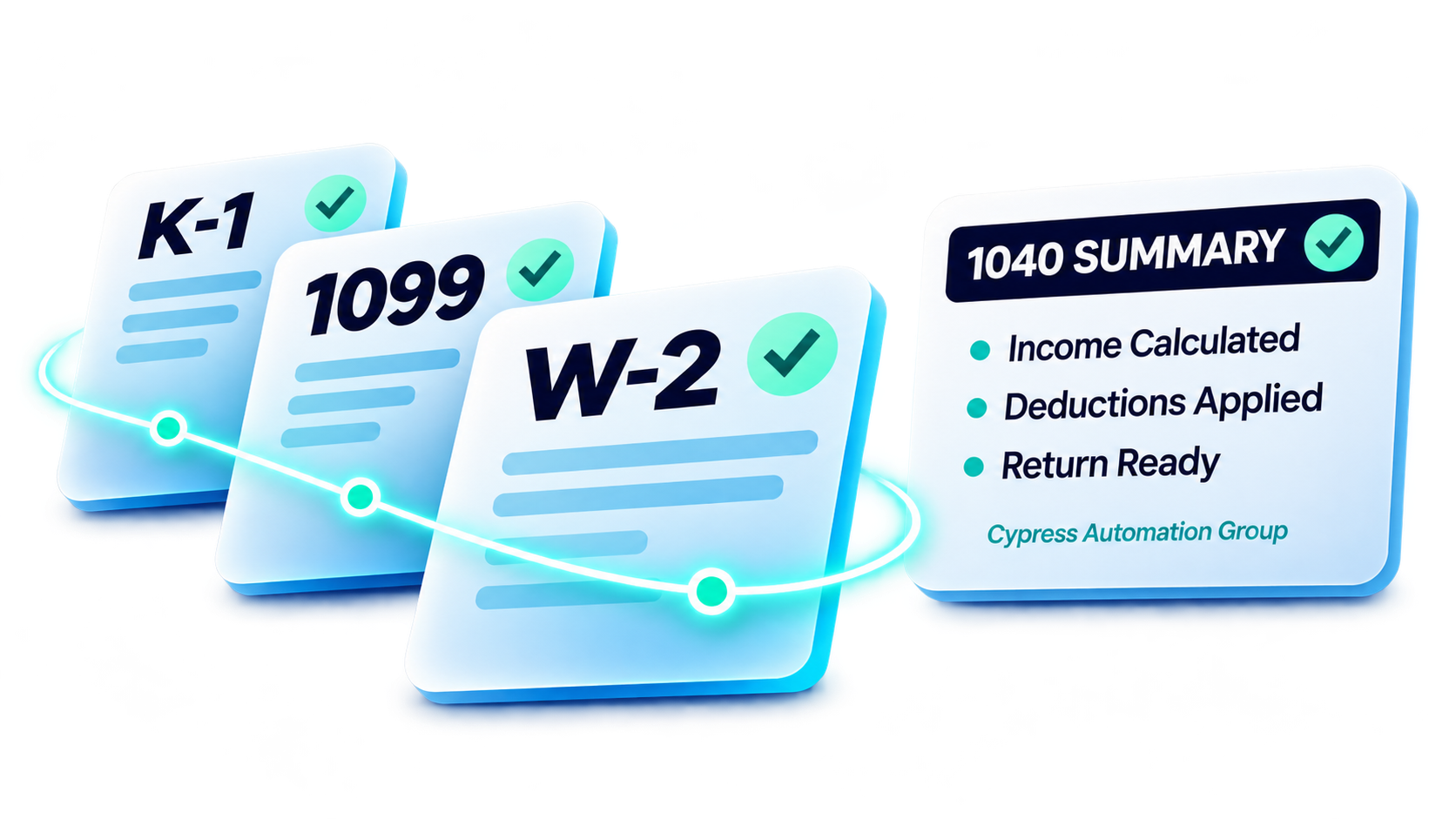
Illustration of Schedule K-1, Form 1099, and Form W-2 leading to a Form 1040 summary

Exceptional Value - Save 35% through Dec 31st

✎

Electronic Engagement Letters

Send your firm's engagement letters for e-signature with client portal invitations.

▣

Fully Branded Client Portal

Secure document uploads and a professional experience under your firm's identity.

☷

Custom Questionnaires & Communications

Tailored client intake, document requests, messages, and automated follow-ups.

▦

Tax Strategy Calculations

Use the strategy library or build your own to evaluate tax-planning scenarios.

✦

Integrated AI Assistant

Research tax questions and get workflow assistance, with professional review.

▰

Form 1040 Preparation & Themis Relay

Prepare workpapers, review the draft, and transfer approved inputs to Drake, ProConnect, or ProSeries.

☁1. RequestClient uploads
›
▤2. ApproveReview extractions
›
▦3. AdjustUpdate workpapers
›
▣4. ReviewForm 1040 draft
›
⇄5. TransferTo your tax software

From the team that has built automation for

AT&T
NCR
Norfolk Southern
Populus Financial Group
Welldyne
CommunityAmerica Credit Union
Crash Champions
Fiserv
Humana
Jack Henry
Finastra
Why firms switch to Themis

Spend Less Time on Manual Tax Preparation

Spend less time entering data, organizing PDFs, and chasing missing documents. Themis automates follow-ups, extracts tax data, and prepares Form 1040 workpapers for review.

STEP 1 · REQUEST DOCUMENTS AND EXTRACT DATA.

Send a document request to your client or have staff upload documents directly. Themis can extract data from supported uploads. Your team reviews, corrects, and approves values before they can populate supported Form 1040 worksheet fields.

Click Anywhere To Pause
LogoYour Firm’s PortalRequest Sent
PDFW-2Employer wagesUploaded
PDF1099-INTBank interestWaiting
PDFSchedule K-1Partnership incomeWaiting
1 of 3 requested documents received · 2 still waiting
Automatic processing● Active
1Read uploaded documents
2Extract tax information
3Populate tax worksheets
Review-ready tax information ✓
Check extracted values before approving them.
Documents arrive automatically.Illustrative client data
SOURCE DOCUMENT EXTRACTION

Upload Your Documents. Let Themis Extract the Data

Whether clients upload documents through your portal or staff add them directly, Themis processes each upload for data extraction. Your team can compare extracted values with the original documents, correct them, and fill in missing information before approval.
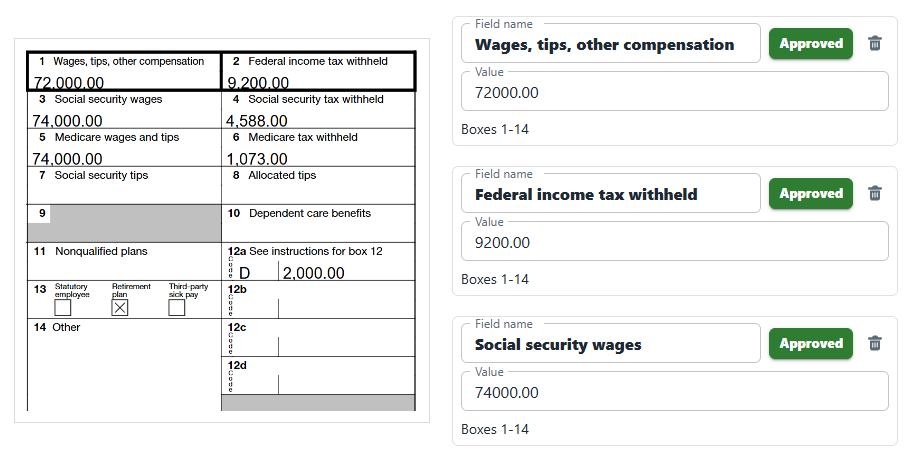
  • Automatic Extraction: Common examples include W-2, W-2G, SSA-1099, 1095-A, 1098, 1098-E, 1098-T, 1099-B, 1099-DIV, 1099-INT, 1099-K, 1099-NEC, 1099-R, and Schedule K-1, plus brokerage statements.
  • Intelligent Document Organization: Themis can separate and label tax documents within combined PDFs.
  • Review Flags: Themis can flag potential issues in extracted data. Check the figures against the source documents before approving them.
  • Effortless Review and Approval: Preview original documents, correct extracted values, and approve the information in just a few clicks. Only approved data flows into your tax worksheets.
Learn more about source document extraction
A W-2 in Themis next to the values it extracted: wages $72,000, federal tax withheld $9,200, and Social Security wages $74,000, each approved
WORKSHEETS

Edit Worksheets and Review the Updated Totals

Approved values can populate supported worksheet fields. When prior-year figures are available, review them alongside current-year amounts. Edit supported inputs and add missing information. When you edit a supported worksheet value, Themis updates the affected figures in the Form 1040 Return Summary.
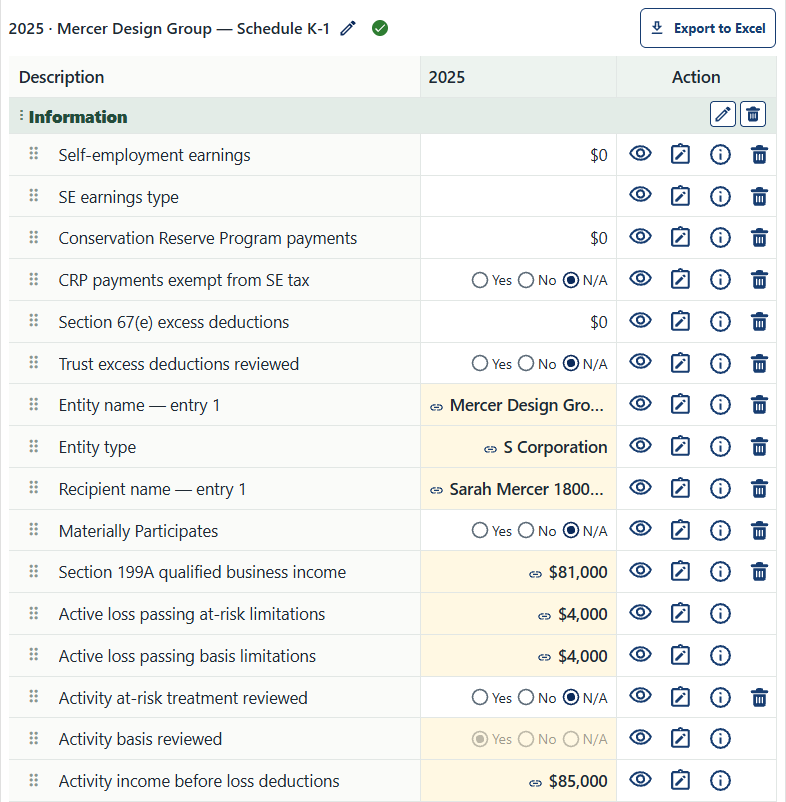
  • Automatic Population: Themis uses approved values to populate supported worksheet lines.
  • Worksheet Edits: Edit supported inputs, add missing information, and review the affected totals.
  • Real-Time Calculations: See how changes to supported worksheet values affect the draft return.
  • Source Document Traceability: Review supporting documents alongside worksheet values where source links are available.
  • Progress Tracking: Mark worksheets complete so your entire team knows exactly where the return stands.
Learn more about worksheets
Themis Schedule K-1 worksheet with imported values highlighted for review and an Export to Excel button
INTEGRATIONS

Transfer Approved Form 1040 Data with Themis Relay

Use Themis Relay to transfer approved Form 1040 data into Drake, ProConnect, or ProSeries. Coming soon: Lacerte and CCH Axcess. For other tax software, export your Themis workpapers to Excel for review and preparation. Your tax software determines whether you can import the data from Excel.

  • Your Software, Your Workflow: Review and file the return in your existing tax software.
  • Approved Information Only: Transfer approved tax figures and any source documents supported by the receiving integration.
  • Review the Handoff: Check transfer results, investigate exceptions, and confirm the information in your tax software.
  • Flexible Excel Export: Export tax worksheet data to Excel for additional review or use with other software workflows.
Explore Themis Relay and Excel export
CLIENT COMMUNICATION

Less Chasing Documents. More Time Preparing Returns.

Themis takes the hassle out of client communication. Automatically generate personalized document requests using prior-year tax information, send professional emails under your firm's branding, and let automated reminders handle the follow-ups. Clients upload documents through their secure portal, while your team tracks outstanding requests and manages communications—all in one place.

  • Intelligent Document Requests: Start with checklist suggestions based on a prior-year Form 1040. Review, add, or remove items before sending.
  • Professional Client Communication: Use ready-made, customizable email templates and secure portal messaging to keep clients informed.
  • Automated Follow-Ups: Schedule reminders for outstanding items. Staff review submissions and mark the request complete when the required work is resolved.
  • Centralized Communication History: Keep portal messages and selected Outlook emails saved by staff in the client’s record.
  • Efficient Staff Coordination: Assign replies to a staff member who can receive notifications when clients respond.

Less time following up. Fewer missing documents. More time serving your clients.

Learn more about client communications Learn more about document requests
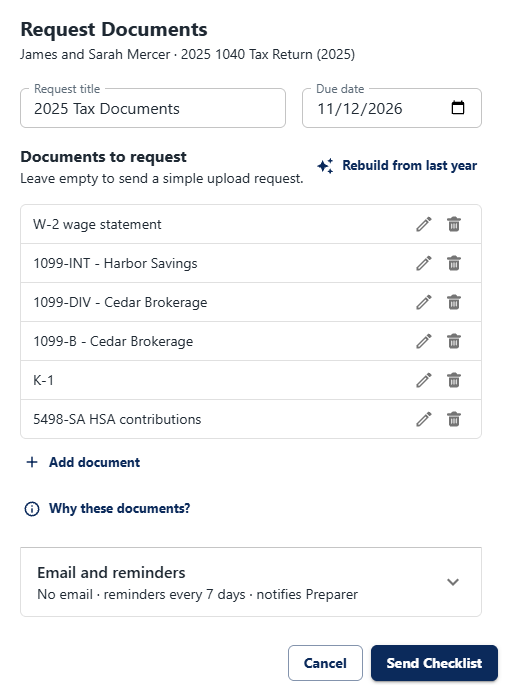
Themis Request Documents dialog with a client document checklist, automatic reminders every 7 days, and a Send Checklist button
REVIEW & FINAL DRAFT

Review Your Form 1040 Draft Before Approval

Themis automatically checks calculations, reconciles totals, and assembles a Form 1040 draft with calculated figures for supported forms and schedules. Review the draft in one place, compare prior-year results, investigate flagged discrepancies, and make corrections or overrides—including requesting changes in plain English. Automated checks handle the groundwork. Your professional judgment drives the final approval.

  • Draft Return Review: Review Form 1040 and supported forms and schedules, with the calculated figures clearly displayed.
  • Supported Calculation Checks: Review calculation results and investigate issues before approving the draft.
  • Prior-Year Comparisons: Compare current-year figures against prior-year results to identify unexpected changes.
  • Full Review and Editing Control: Examine supporting worksheets, correct individual values, override results, and request adjustments in plain English.
  • Final Draft and Approval: Review the assembled return, resolve outstanding issues, and approve the results before transferring anything to your tax software.

Your team reviews and approves the draft before transfer.

Learn more about review and final draft
HOW IT WORKS

From Setup to Your First Return in Three Simple Steps

Use Themis in your browser and keep your existing tax software. Themis Relay connects to your tax software. Setup depends on the integration. Use Themis to prepare workpapers and review a Form 1040 draft. Your team completes and files the return in its tax software.

Take the Product Tour
  1. SET UP YOUR FIRM AND CLIENT PORTAL Add your logo, invite your team, and configure your branded client portal. Set roles and permissions, add templates, and configure supported storage connections your firm chooses to use.
  2. UPLOAD DOCUMENTS. LET THEMIS DO THE WORK. Send personalized document requests or have your staff upload directly. Clients submit their documents through your firm's branded, secure portal. Themis can extract data from supported uploads. Staff review and approve values before they can populate supported Form 1040 worksheet fields.
  3. REVIEW, APPROVE, AND TRANSFER. Edit supported worksheet inputs, review updated totals, and examine the Form 1040 draft and included schedules. Then use Themis Relay to transfer approved data to supported tax software, or export the workpapers to Excel.

Guided tours help your team get started, and our support team is available when you need assistance. Talk to our team →

SECURITY

Security Engineered Into Every Layer

Identity & Authentication

Microsoft Entra ID authentication and invitation-only access.

Tenant Data Isolation

Firm-level data segregation and client-specific access boundaries.

Role-Based Staff Access

Staff access is based on assigned roles.

Client Portal Access

Clients can access documents your firm shares with them.

See Themis in Action

Book a demo to see a sample Form 1040 engagement, from the first document request to staff review and a Themis Relay transfer.

Optional Setup / walkthrough video What getting started with Themis looks like.
FAQ

Questions and Resources

How much does Themis cost?

The $449 signup fee includes the first seat through the signup month. Each additional seat costs $249 at signup. Starting at 12:01 a.m. UTC on the first day of the following month, membership costs $249 per seat per month. Applicable taxes are extra. See pricing.

How is my clients' information kept secure?

Themis protects access through secure sign-in and keeps each firm's data separate. Clients can access the documents your firm shares with them. Learn more about security or see how Themis handles information in our Privacy Policy.

Which tax forms can Themis read?

Themis can extract data from supported PDF, JPG, PNG, and TIFF files. Other files may be accepted for upload without being eligible for extraction. Your team reviews, corrects, and approves extracted values before they can populate supported worksheet fields. Examples of tax forms and records Themis can read include:

  • Tax forms: W-2, W-2G, SSA-1099, 1095-A, 1095-B, 1095-C, 1098, 1098-E, 1098-T, 1099-B (including Section 1256 broker summaries), 1099-DIV, 1099-G, 1099-INT, 1099-K, 1099-LTC, 1099-MISC, 1099-NEC, 1099-OID, 1099-PATR, 1099-Q, 1099-QA, 1099-R, 1099-S, 1099-SA, 2439, 4835, 5498, 5498-QA, and 5498-SA.
  • Schedules and business records: Schedules K-1 from trusts and estates (Form 1041), partnerships (Form 1065), and S corporations (Form 1120-S), including supplemental statements. Themis can also read Schedule C balance sheets and profit and loss statements, Schedule E rental summaries, farm profit and loss statements, farm income averaging records, crop-share leases, basis and QBI worksheets, business receipts, mileage logs, home office expense statements, equipment invoices and disposal records, casualty and insurance records, and oil and gas income and expense statements.
  • Other supporting records: Brokerage statements, employee stock purchase records, digital asset ledgers, investment interest statements, foreign dividend and tax statements, rental and royalty ledgers, mortgage interest and property expense records, real estate and exchange closing statements, vehicle registration and sales tax receipts, cash and noncash donation records, household and dependent records, child and dependent care payments, itemized expenses, health coverage reconciliations, medical and long-term care expenses, HSA and ABLE account records, education ledgers, IRA contribution and basis records, required minimum distribution records, canceled debt statements, gambling diaries, solar installation and payment records, estimated and extension tax payments, and qualified overtime payroll detail.

Themis reads prior-year Form 1040 returns to help build document requests and worksheets. Prior-year reading and current-year preparation for Forms 1041, 1065, 1120, and 1120-S are coming soon. Reading a Schedule K-1 for an individual return does not include preparing the entity return. Themis Relay transfers supported Form 1040 inputs, and coverage varies by integration.

Does Themis work with my tax software?

Themis Relay supports Form 1040 transfers to Drake, ProConnect, and ProSeries. Lacerte and CCH Axcess integrations are coming soon. For other tax software, you can export workpapers to Excel. Your staff reviews the transfer and files through your tax software. Explore Themis Relay and Excel export

How do I get my team and clients onboarded?

Invite your staff from the Team page and choose each person's role: Owner, Admin, Preparer, or Staff. Each person gets an email invitation to join your firm. Clients join by invitation: when you send their first questionnaire or document request, Themis emails them a secure portal invite with your firm's logo and colors, and they set up their sign-in when they accept it. You can see who hasn't joined yet and resend an invite in one click.

Which tax forms can Themis read?

Sample Tax Return and Cost Estimate

The $4.98 estimate divides the $249 promotional monthly seat rate by 50 Form 1040 returns. One seat’s included monthly token allowance may support about 50 returns like the sample. Actual usage varies.

The sample includes an electronically signed engagement letter from your firm's template, a client portal for uploads, five client communications (including a custom questionnaire), three tax strategy calculations, two AI Assistant questions, and a 20-page prior-year Form 1040.

The one-page current-year PDFs include two Forms W-2, two Schedules K-1 (Form 1065), three each of Forms 1099-B and 1099-DIV, two Forms 1099-INT, and one each of Forms 1098, 1098-E, 1098-T, 1095-A, 1099-G, 1099-K, 1099-MISC, 1099-NEC, 1099-R, and SSA-1099, one Schedule C business expense statement, and one Schedule E rental property summary.